



The Parlay Finder helps you build a sportsbook parlay and manage its cover one leg at a time.
A parlay is a single bet made of multiple selections. It wins only if every leg wins. If even one selection loses, the whole parlay loses. The total parlay odds are based on the combined odds of all the individual selections.
The Parlay Finder is designed for parlay-based Matched Betting offers. You place the parlay at a sportsbook, then cover it sequentially, one active leg at a time, using the hedge amounts calculated by the tool.
Each leg is covered by betting the opposite outcome on ProphetX (or at another sportsbook), using selections imported from the Bet Finder.
For example:
- You place a 4-leg parlay at a sportsbook.
- The Parlay Finder calculates how to cover the first active leg.
- If the first leg loses, the parlay is already lost and no further hedge is needed.
- If the first leg wins, you update the odds for the next active leg if necessary and place the next hedge bet.
- You continue this process until the parlay loses or all legs win.
The Parlay Finder shows the planned result for each possible scenario based on the odds and settings currently entered.
When to Use the Parlay Finder
The Parlay Finder is particularly useful when:
- An offer requires you to place a parlay instead of a single bet.
- You are completing a parlay qualifying bet, parlay bonus, parlay refund, parlay insurance, or parlay bonus bet offer.
- You want to calculate the correct sequential cover for each leg of the parlay.
- You want to see in advance how the operation performs if the parlay loses at a specific leg or if all selections win.
The Parlay Finder is different from the Bet Finder when used on its own.
- The Bet Finder helps you cover a single sportsbook bet by betting the opposite outcome on ProphetX or at another sportsbook.
- The Parlay Finder applies this same hedge method to the legs of a parlay and manages the operation sequentially.
How the Parlay Finder Works
The Parlay Finder is designed around one key principle: a parlay is covered one leg at a time.
When you first build the parlay, the Parlay Finder calculates:
- The sportsbook parlay structure.
- The hedge for each leg.
- The hedge amount for the first active leg.
- The expected results if the parlay loses on a specific leg or if all legs win.
- The future hedge amounts based on the odds currently entered for the later legs.
Each leg is covered by betting the opposite outcome on ProphetX (or at another sportsbook).
The amounts for later legs are not necessarily final. By the time a later event becomes active, the relevant ProphetX odds or sportsbook odds may have changed. For this reason, the Parlay Finder should be updated before placing each new hedge bet.
The workflow is:
- Place the parlay at the sportsbook.
- Cover the first active leg.
- Wait for the first event to settle.
- If the parlay is still alive, update the odds for the next active leg and place the next hedge bet.
- Continue until the parlay loses or all legs win.
How to Use the Parlay Finder Step by Step
1. Open the Parlay Finder
Open the Parlay Finder from the NinjaBet tools area.
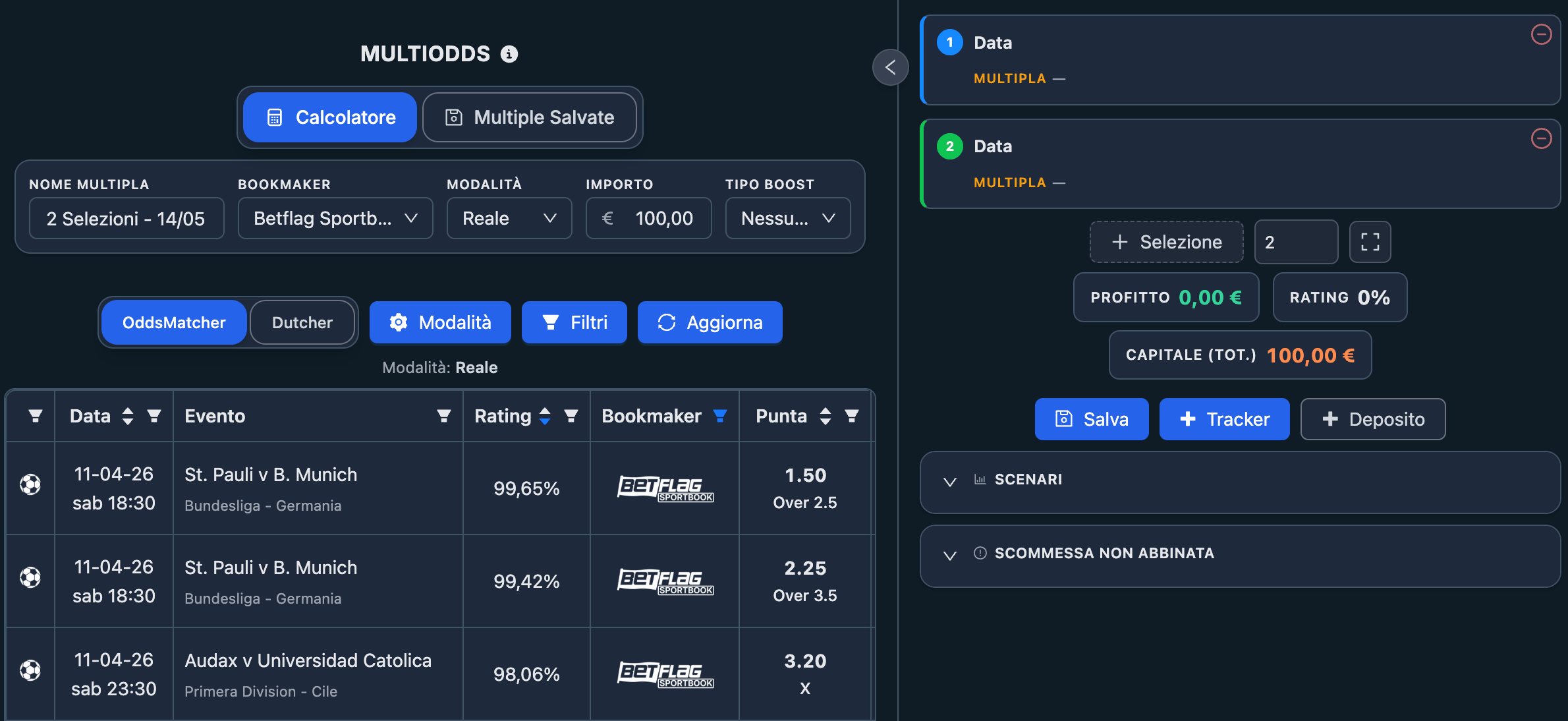
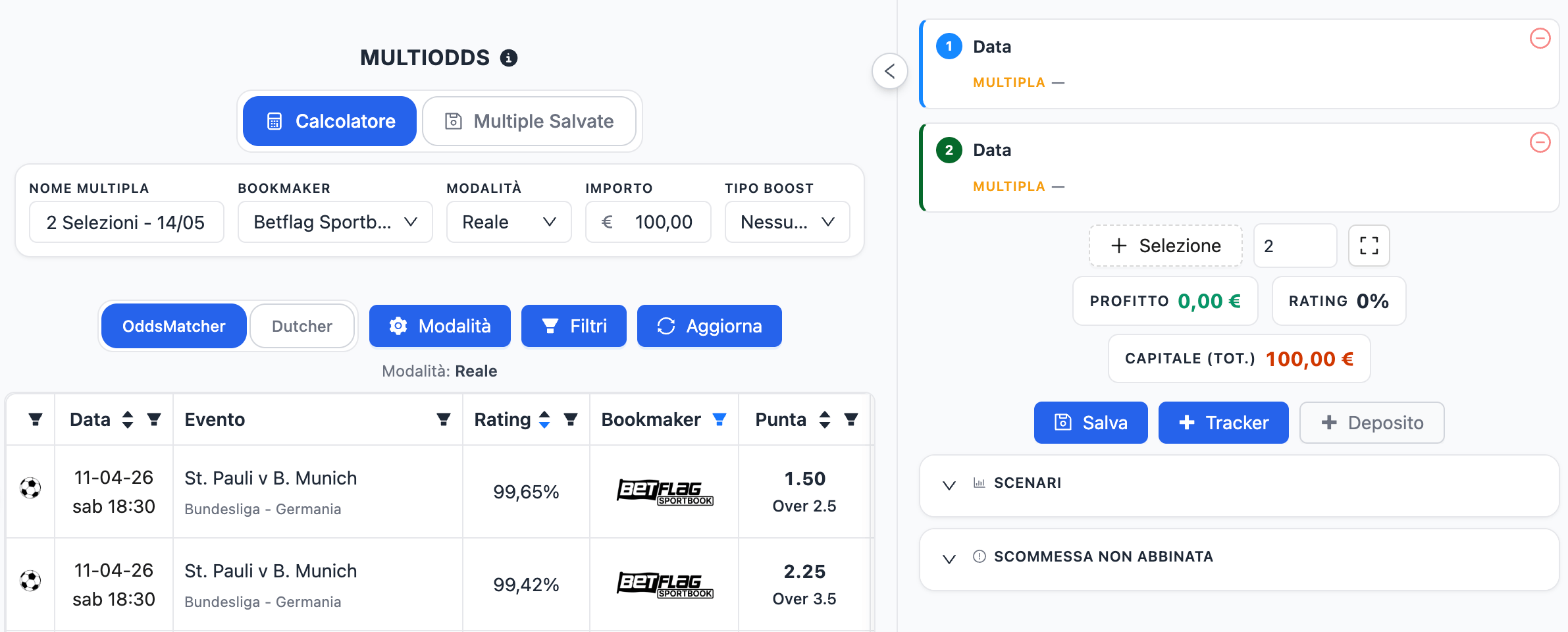
You will see:
- The parlay settings area.
- The parlay panel with its selections.
- The result summary and scenario sections.
- The integrated Bet Finder.
2. Configure the Parlay Settings
Before adding selections, enter the settings for the operation:
- The sportsbook where the parlay will be placed.
- The correct rating mode for the offer.
- The stake of the parlay.
- Any additional values required by the selected mode, such as refund or playthrough information.
- Any applicable odds boost or parlay boost setting, if the offer includes one.
Choosing the correct rating mode is essential because it changes how the Parlay Finder calculates the rating, hedge amounts, and expected result.
3. Add the Selections
Build the parlay by adding the required selections.
You can:
- Use the integrated Bet Finder to find selections you can cover by betting the opposite outcome on ProphetX or at another sportsbook.
- Enter or edit a selection manually when needed.
The Parlay Finder automatically sorts the selections by event start time, so they appear in the correct sequence for the hedge calculation.
4. Review the Parlay
Once the selections are filled, review:
- The combined parlay odds.
- The calculated rating.
- The expected result.
- The scenario table.
- The hedge amount needed for the first active leg.
5. Save the Parlay
Once the parlay has been built and reviewed, save it before placing the sportsbook bet.
Saving the parlay makes it easier to:
- Reopen it later.
- Continue managing the sequential hedges.
- Update later odds as events settle.
6. Build the Parlay at the Sportsbook
Open the sportsbook and add the same selections to the betslip.
Before placing the parlay, confirm that:
- The selections are the same as those shown in the Parlay Finder.
- The market and selection of every leg are correct.
- The total odds on the sportsbook betslip match the total odds shown in the Parlay Finder.
7. Place the Parlay
Once everything matches, place the parlay at the sportsbook.
8. Cover the First Active Leg
After the parlay has been placed, cover only the first active leg using the amount shown by the Parlay Finder. This means betting the opposite outcome on ProphetX (or at another sportsbook).
Once the first hedge has been placed, lock the covered selection in the Parlay Finder, add both the sportsbook parlay and the first hedge bet to the Bet Tracker, and save the parlay again.
9. Continue Leg by Leg
When the first event finishes:
- If the parlay has lost, the operation is complete.
- If the parlay is still alive, update the odds for the next active leg if they have changed and place the next hedge bet using the new amount shown by the Parlay Finder.
After placing each new hedge bet, lock the covered selection, add the hedge bet to the Bet Tracker, and save the parlay again.
Repeat the same process for every remaining leg, until the parlay loses or all selections win.
What Is Shown in the Parlay Finder
The Parlay Finder is organized into a few main areas.
Settings
This is where you define the operation:
- Sportsbook
- Rating mode
- Stake
- Offer-specific values
- Boost settings, when applicable
Integrated Bet Finder
Below the parlay setup, the integrated Bet Finder helps you find selections you can cover by betting the opposite outcome on ProphetX or at another sportsbook, and add the result directly to the parlay.
Parlay Selections
This area contains the selections that make up the parlay. Each selection shows the event and odds data used in the calculation, together with the platform used for the hedge.
Summary
The Summary section gives you the main numbers of the parlay at a glance, such as:
- Total parlay odds.
- Expected profit or loss.
- Rating.
- Total capital required by the operation.
Scenarios
This section shows what happens if:
- The first leg loses.
- The first leg wins and the second loses.
- The parlay survives longer and then loses at a later leg.
- All legs win.
Bet Not Matched
This section helps you recalculate the hedge if a hedge bet on ProphetX does not fill fully at the odds you originally planned to use.
Saved Parlays
This area lets you reopen saved parlays and continue managing them later.
Rating Settings
The rating settings determine how the Parlay Finder evaluates the parlay.
Depending on the type of operation, the available modes may include:
- Cash
- Bonus Bet
- 2nd Chance
- Playthrough
You should also enter the stake and any additional values required by the chosen mode.
The same parlay can produce a very different rating depending on the mode selected. Always choose the mode first, then compare the quality of the parlay.
Parlay Boosts
Some sportsbooks offer a boost on parlay odds. When this applies, enter the correct boost information in the Parlay Finder so the total odds and scenario results are calculated properly.
If the sportsbook applies a boost, always verify that the final boosted odds on the sportsbook betslip match what you entered in the Parlay Finder.
Adding and Editing Selections
Each selection is one leg inside the parlay.
A selection includes:
- Date and time
- Sport and competition
- Event
- Market
- Selection placed in the parlay
- Sportsbook odds
- Hedge odds
- ProphetX commission, when covering on ProphetX
There are two ways to build the parlay:
- Import from the Bet Finder
This creates a selection you cover by betting the opposite outcome on ProphetX or at another sportsbook. - Edit manually
You can adjust the selection data directly inside the Parlay Finder if needed.
The Parlay Finder automatically sorts the selections by event start time, so even if you do not add them chronologically, the tool will place them in the correct sequence for the hedge calculation.
How to Choose Good Selections for a Parlay
A good Parlay Finder parlay is not just one with a high rating. It also needs to be practical to manage correctly.
When choosing the selections, look for:
- Events that satisfy the promotion requirements.
- Selections that meet any minimum odds or market conditions.
- Enough ProphetX liquidity, or a suitable sportsbook, to place the hedge.
- Events that are scheduled far enough apart to manage sequentially.
Avoid building parlays with events that are simultaneous or too close together. Since the hedge is handled leg by leg, you need enough time to:
- Confirm the result of the previous leg.
- Update the next hedge odds if they have moved.
- Place the next hedge bet correctly.
The Parlay Finder includes an automatic warning when events are scheduled too close together. Treat this warning seriously, especially if you are still learning how to manage parlay hedges.


A slightly lower-rated parlay can be better than a higher-rated one if it is much easier and safer to execute.
Summary
The Summary section gives you a quick overview of the parlay.
It shows:
- Total Odds — the combined sportsbook odds of the parlay.
- Profit — the estimated result of the operation based on the current inputs.
- Rating — the efficiency of the parlay for the selected mode.
- Total Capital — the overall capital required to carry out the operation.
Use the summary to understand whether the parlay looks suitable, but do not rely on it alone. The Scenarios section is the most important place to confirm how the operation behaves.
Scenarios
The Scenarios section shows the result of the operation in each possible case.
For example, with a 4-leg parlay, the scenarios include:
- The parlay loses on leg 1.
- Leg 1 wins, but the parlay loses on leg 2.
- Legs 1 and 2 win, but the parlay loses on leg 3.
- The first three legs win, but the parlay loses on leg 4.
- All four legs win.
For each scenario, the Parlay Finder shows the calculated net result based on the current settings and odds.
This is especially useful because parlays are not covered in a single step. The result depends on how far the parlay progresses before it loses, or whether it wins completely.
Before placing the operation, check that every scenario produces a result you are comfortable with.
Covering the Parlay Leg by Leg
This is the most important concept in the Parlay Finder. You do not cover the entire parlay at once. You cover it sequentially.
Before the first event
- Place the sportsbook parlay.
- Cover only the first active leg using the amount shown by the Parlay Finder.
- Lock the covered selection once the hedge has been placed.
- Save the parlay again.
After the first event
- If the first leg loses, the parlay has lost and the operation is complete.
- If the first leg wins, the parlay remains active. Update the odds for the next active leg if they have moved, then place the next hedge bet using the amount shown by the Parlay Finder.
- Lock the covered selection once the new hedge has been placed.
- Save the parlay again.
Continue the same way
After each leg:
- If the parlay loses, stop.
- If the parlay remains alive, refresh the next hedge odds, place the next hedge bet, lock the completed hedge, and save the parlay again.
This continues until the parlay loses or all legs win.
Updating Hedge Odds for Later Legs
The hedge odds for later legs are only preliminary when you first build the parlay.
By the time a later leg becomes active:
- The ProphetX odds may have changed.
- The opposite sportsbook odds used for the hedge may have changed.
This means the hedge amount originally calculated for that leg may no longer be correct.
Before placing each new hedge bet:
- Reopen the saved parlay.
- Update the current odds for the next legs.
- Let the Parlay Finder recalculate the required hedge amount.
- Place the new hedge bet using the updated amount shown by the tool.
- Lock the completed hedge once it has been placed.
- Save the parlay again so the updated odds and locked hedge are preserved.
This step is essential for keeping the operation aligned with the latest available odds.
Locking Confirmed Hedge Amounts
Once you have placed the hedge bet for a leg, you can lock that amount inside the Parlay Finder.
Locking a leg tells the tool that the displayed hedge amount has already been placed and should remain fixed. This allows the Parlay Finder to calculate the remaining part of the parlay using the real amounts that have already been executed.
This is especially useful because:
- Later odds can change.
- You may need to reopen the parlay after the previous event has settled.
- The scenario results should reflect the covers that have already been placed.
As the parlay progresses, lock each completed hedge after placing it. This helps keep the calculation aligned with the actual state of the operation.
After locking a completed hedge, always save the parlay again. This ensures that the locked amount remains stored when you reopen the parlay later to manage the next active leg.
Bet Not Matched
The Bet Not Matched section applies when a hedge bet cannot be placed fully at the odds or amount originally calculated by Parlay Finder.
This can happen when:
- A hedge bet on ProphetX is only partially filled or stays pending.
- A sportsbook does not allow you to place the full amount of the opposite bet.
- The available odds change before you complete the remaining part of the hedge.
The Bet Not Matched section helps you calculate how to complete the remaining hedge using the new available odds.
Use it when:
- A ProphetX hedge is only partially filled.
- A ProphetX hedge stays pending.
- The opposite bet can only be placed for part of the required amount.
- You need to recalculate the remaining hedge after the odds change.
Enter the requested values and Parlay Finder will show the new amount required to complete the hedge. For a more detailed explanation, read the dedicated guide on Bet Not Matched.
This is especially important with parlay operations, because an incomplete cover on one leg can affect the final result of the whole sequence.
ProphetX Commission
ProphetX charges a 2% commission on your net winnings — and nothing if the hedge bet loses or is cancelled.
The Parlay Finder takes this commission into account when calculating selections covered on ProphetX.
Make sure the commission setting in your NinjaBet account matches the commission you actually pay on ProphetX. If the commission is set incorrectly, the result shown by the Parlay Finder may differ from the real result.
Saving Parlays
Saving a parlay is useful because parlay operations often continue over several events and may need to be reopened later.
Saved parlays allow you to:
- Return to a parlay that is still in progress.
- Review the selections and current settings.
- Update the odds for the next active leg.
- Continue managing the hedge sequence.
- Keep track of parlays linked to specific promotions.
For this reason, it is good practice to save the parlay once it has been built and checked, before placing the sportsbook bet. You should also save it again every time you reopen it and make changes, such as updating later hedge odds or locking a completed hedge.
Adding the Parlay to the Bet Tracker
Use the Add to Bet Tracker function, through the + Tracker button, to record the bets placed during the parlay operation.
The parlay bet and the hedge bets are saved separately:
- Save Parlay Bet — to record the parlay placed at the sportsbook.
- Save Hedge Bet — to record the hedge bet used for a leg.
After placing the parlay, add it to the Bet Tracker. Then, each time you place a new hedge bet for an active leg, add that hedge bet separately as well.
This keeps your Bet Tracker aligned with the actual bets placed during the operation.
Example
Suppose you need to place a $20 4-leg parlay for a sportsbook promotion.
You:
- Open the Parlay Finder.
- Select the sportsbook where the parlay must be placed.
- Choose the correct rating mode for the offer.
- Enter $20 as the parlay stake.
- Add four selections that meet the promotion conditions, using the Bet Finder to cover each one by betting the opposite outcome on ProphetX or at another sportsbook.
- Check that the events are spaced far enough apart. If the Parlay Finder shows a warning for events scheduled too close together, consider changing the selections.
- Review the Summary and Scenarios.
- Save the parlay.
- Open the sportsbook and add the same four selections to the parlay betslip.
- Check that the combined odds match the total odds shown in the Parlay Finder.
- Place the $20 parlay.
- Cover the first active leg using the amount shown by the Parlay Finder, betting the opposite outcome on ProphetX or at another sportsbook.
- Lock the completed hedge once it has been placed.
- Add the sportsbook parlay and the first hedge bet to the Bet Tracker.
- Save the parlay again.
- After the first event settles:
- If the parlay loses, stop.
- If it remains live, update the odds for the next active leg, place the new hedge bet, lock the completed hedge, add it to the Bet Tracker, and save the parlay again. - Repeat the same logic for the remaining legs.
The Scenarios section has already shown the expected result for every way the parlay can end.
Important Checks Before Placing the Bets
Before confirming any Parlay Finder operation, always verify the following:
- Every event is correct
- Every market is correct
- Every selection and opposite hedge is correct
- The total parlay odds are correct
- The events are spaced well enough
- The odds are still current
- There is enough ProphetX liquidity, or the sportsbook hedge is still available, for each leg
- The rating mode is correct
- The ProphetX commission is correct
Final Summary
The Parlay Finder is the tool to use when you need to build and manage a sportsbook parlay within a Matched Betting operation.
To use it correctly:
- Open the Parlay Finder.
- Select the sportsbook and the rating mode that matches the offer.
- Enter the parlay stake and any offer-specific values.
- Add the parlay selections from the Bet Finder, covering each leg by betting the opposite outcome on ProphetX or at another sportsbook.
- Choose events that satisfy the offer rules and are practical to manage sequentially.
- Review the Summary and every Scenario.
- Save the parlay.
- Build the same parlay on the sportsbook and confirm the total odds.
- Place the sportsbook parlay.
- Cover the first active leg using the amount shown by the Parlay Finder.
- Lock the completed hedge.
- Add the sportsbook parlay and the first hedge bet to the Bet Tracker.
- Save the parlay again.
- If the parlay continues, update the odds for the next active leg, place the new hedge, lock the completed hedge, add it to the Bet Tracker, and save the parlay again.
- Repeat until the parlay loses or all legs win.
Used correctly, the Parlay Finder gives you a clear and controlled workflow for parlay-based Matched Betting offers, helping you manage the hedge for each leg one step at a time.
What's new in September 2026
Three changes of the first month of the new NinjaBet concern Parlay Finder.
- Cover a leg with three outcomes: the +/− button on the row (Add a hedge bet (3-Way)) switches a leg from the 2-way hedge to the 3-way back-back hedge, with two bets on the other two outcomes and the sportsbook of each shown in the panel; the same button goes back to 2-way. The saved parlay remembers both hedges.
- Clearer odds: in the summary the total odds without boost appear next to the boosted odds, and the boost percentage accepts two decimals. The Copy event name and Copy date buttons help you find the game at the sportsbook or on ProphetX.
- Saved Parlays: search and filter by name, event or sportsbook (in ValueBet Parlays too), add a Notes field, browse every page without the old limit of 50, delete from the row and use Save as new to create a copy to edit.
The step-by-step procedure is in How do I complete a parlay offer with Parlay Finder?; the summary of everything that changed is in What changed with the new NinjaBet site?.
What's new in October 2026: legs that start at the same time
Two legs that start together are now covered inside Parlay Finder, with no detour through the Calculator: the Link legs 1 and 2 button between the two rows opens a window with the opposite of leg 1 as a single and the combo (leg 1 + the opposite of leg 2 at one sportsbook), priced with the best lines found or entered by hand. Every hedge of the block is placed before kick-off, one lock covers the block and Unlink goes back to covering one leg at a time. Up to 6 legs can be linked. Details in How do I complete a parlay offer with Parlay Finder?.
When to Use the Parlay Finder
The Parlay Finder is particularly useful when:
- An offer requires you to place a parlay instead of a single bet.
- You are completing a parlay qualifying bet, parlay bonus, parlay refund, parlay insurance, or parlay bonus bet offer.
- You want to calculate the correct sequential cover for each leg of the parlay.
- You want to see in advance how the operation performs if the parlay loses at a specific leg or if all selections win.
The Parlay Finder is different from the Bet Finder when used on its own.
- The Bet Finder helps you cover a single sportsbook bet by betting the opposite outcome on ProphetX or at another sportsbook.
- The Parlay Finder applies this same hedge method to the legs of a parlay and manages the operation sequentially.
How the Parlay Finder Works
The Parlay Finder is designed around one key principle: a parlay is covered one leg at a time.
When you first build the parlay, the Parlay Finder calculates:
- The sportsbook parlay structure.
- The hedge for each leg.
- The hedge amount for the first active leg.
- The expected results if the parlay loses on a specific leg or if all legs win.
- The future hedge amounts based on the odds currently entered for the later legs.
Each leg is covered by betting the opposite outcome on ProphetX (or at another sportsbook).
The amounts for later legs are not necessarily final. By the time a later event becomes active, the relevant ProphetX odds or sportsbook odds may have changed. For this reason, the Parlay Finder should be updated before placing each new hedge bet.
The workflow is:
- Place the parlay at the sportsbook.
- Cover the first active leg.
- Wait for the first event to settle.
- If the parlay is still alive, update the odds for the next active leg and place the next hedge bet.
- Continue until the parlay loses or all legs win.
How to Use the Parlay Finder Step by Step
1. Open the Parlay Finder
Open the Parlay Finder from the NinjaBet tools area.
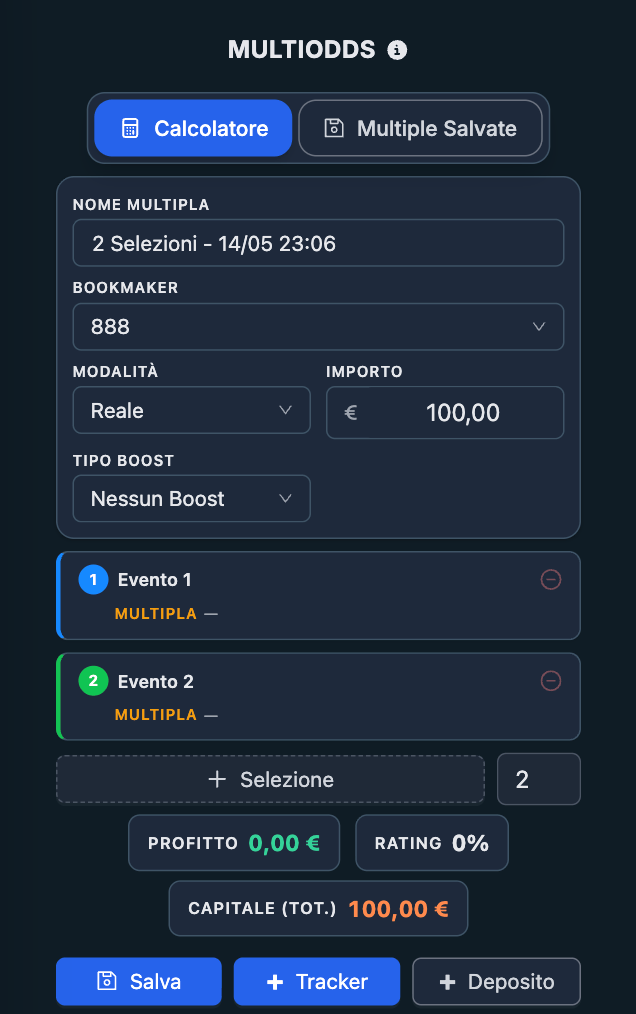
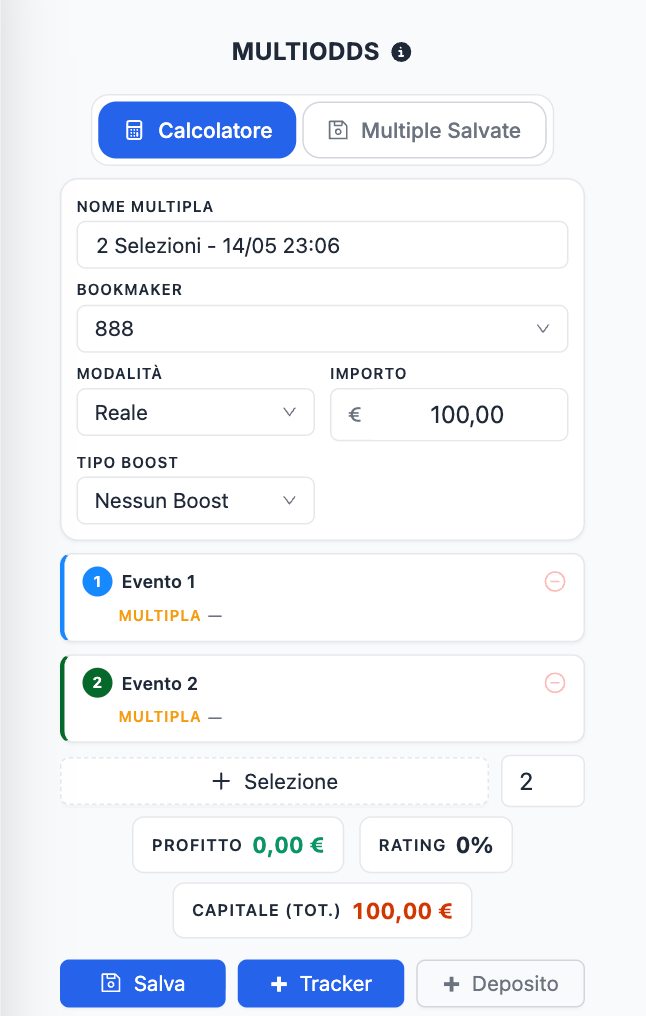
You will see:
- The parlay settings area.
- The parlay panel with its selections.
- The result summary and scenario sections.
- The integrated Bet Finder.
2. Configure the Parlay Settings
Before adding selections, enter the settings for the operation:
- The sportsbook where the parlay will be placed.
- The correct rating mode for the offer.
- The stake of the parlay.
- Any additional values required by the selected mode, such as refund or playthrough information.
- Any applicable odds boost or parlay boost setting, if the offer includes one.
Choosing the correct rating mode is essential because it changes how the Parlay Finder calculates the rating, hedge amounts, and expected result.
3. Add the Selections
Build the parlay by adding the required selections.
You can:
- Use the integrated Bet Finder to find selections you can cover by betting the opposite outcome on ProphetX or at another sportsbook.
- Enter or edit a selection manually when needed.
The Parlay Finder automatically sorts the selections by event start time, so they appear in the correct sequence for the hedge calculation.
4. Review the Parlay
Once the selections are filled, review:
- The combined parlay odds.
- The calculated rating.
- The expected result.
- The scenario table.
- The hedge amount needed for the first active leg.
5. Save the Parlay
Once the parlay has been built and reviewed, save it before placing the sportsbook bet.
Saving the parlay makes it easier to:
- Reopen it later.
- Continue managing the sequential hedges.
- Update later odds as events settle.
6. Build the Parlay at the Sportsbook
Open the sportsbook and add the same selections to the betslip.
Before placing the parlay, confirm that:
- The selections are the same as those shown in the Parlay Finder.
- The market and selection of every leg are correct.
- The total odds on the sportsbook betslip match the total odds shown in the Parlay Finder.
7. Place the Parlay
Once everything matches, place the parlay at the sportsbook.
8. Cover the First Active Leg
After the parlay has been placed, cover only the first active leg using the amount shown by the Parlay Finder. This means betting the opposite outcome on ProphetX (or at another sportsbook).
Once the first hedge has been placed, lock the covered selection in the Parlay Finder, add both the sportsbook parlay and the first hedge bet to the Bet Tracker, and save the parlay again.
9. Continue Leg by Leg
When the first event finishes:
- If the parlay has lost, the operation is complete.
- If the parlay is still alive, update the odds for the next active leg if they have changed and place the next hedge bet using the new amount shown by the Parlay Finder.
After placing each new hedge bet, lock the covered selection, add the hedge bet to the Bet Tracker, and save the parlay again.
Repeat the same process for every remaining leg, until the parlay loses or all selections win.
What Is Shown in the Parlay Finder
The Parlay Finder is organized into a few main areas.
Settings
This is where you define the operation:
- Sportsbook
- Rating mode
- Stake
- Offer-specific values
- Boost settings, when applicable
Integrated Bet Finder
Below the parlay setup, the integrated Bet Finder helps you find selections you can cover by betting the opposite outcome on ProphetX or at another sportsbook, and add the result directly to the parlay.
Parlay Selections
This area contains the selections that make up the parlay. Each selection shows the event and odds data used in the calculation, together with the platform used for the hedge.
Summary
The Summary section gives you the main numbers of the parlay at a glance, such as:
- Total parlay odds.
- Expected profit or loss.
- Rating.
- Total capital required by the operation.
Scenarios
This section shows what happens if:
- The first leg loses.
- The first leg wins and the second loses.
- The parlay survives longer and then loses at a later leg.
- All legs win.
Bet Not Matched
This section helps you recalculate the hedge if a hedge bet on ProphetX does not fill fully at the odds you originally planned to use.
Saved Parlays
This area lets you reopen saved parlays and continue managing them later.
Rating Settings
The rating settings determine how the Parlay Finder evaluates the parlay.
Depending on the type of operation, the available modes may include:
- Cash
- Bonus Bet
- 2nd Chance
- Playthrough
You should also enter the stake and any additional values required by the chosen mode.
The same parlay can produce a very different rating depending on the mode selected. Always choose the mode first, then compare the quality of the parlay.
Parlay Boosts
Some sportsbooks offer a boost on parlay odds. When this applies, enter the correct boost information in the Parlay Finder so the total odds and scenario results are calculated properly.
If the sportsbook applies a boost, always verify that the final boosted odds on the sportsbook betslip match what you entered in the Parlay Finder.
Adding and Editing Selections
Each selection is one leg inside the parlay.
A selection includes:
- Date and time
- Sport and competition
- Event
- Market
- Selection placed in the parlay
- Sportsbook odds
- Hedge odds
- ProphetX commission, when covering on ProphetX
There are two ways to build the parlay:
- Import from the Bet Finder
This creates a selection you cover by betting the opposite outcome on ProphetX or at another sportsbook. - Edit manually
You can adjust the selection data directly inside the Parlay Finder if needed.
The Parlay Finder automatically sorts the selections by event start time, so even if you do not add them chronologically, the tool will place them in the correct sequence for the hedge calculation.
How to Choose Good Selections for a Parlay
A good Parlay Finder parlay is not just one with a high rating. It also needs to be practical to manage correctly.
When choosing the selections, look for:
- Events that satisfy the promotion requirements.
- Selections that meet any minimum odds or market conditions.
- Enough ProphetX liquidity, or a suitable sportsbook, to place the hedge.
- Events that are scheduled far enough apart to manage sequentially.
Avoid building parlays with events that are simultaneous or too close together. Since the hedge is handled leg by leg, you need enough time to:
- Confirm the result of the previous leg.
- Update the next hedge odds if they have moved.
- Place the next hedge bet correctly.
The Parlay Finder includes an automatic warning when events are scheduled too close together. Treat this warning seriously, especially if you are still learning how to manage parlay hedges.


A slightly lower-rated parlay can be better than a higher-rated one if it is much easier and safer to execute.
Summary
The Summary section gives you a quick overview of the parlay.
It shows:
- Total Odds — the combined sportsbook odds of the parlay.
- Profit — the estimated result of the operation based on the current inputs.
- Rating — the efficiency of the parlay for the selected mode.
- Total Capital — the overall capital required to carry out the operation.
Use the summary to understand whether the parlay looks suitable, but do not rely on it alone. The Scenarios section is the most important place to confirm how the operation behaves.
Scenarios
The Scenarios section shows the result of the operation in each possible case.
For example, with a 4-leg parlay, the scenarios include:
- The parlay loses on leg 1.
- Leg 1 wins, but the parlay loses on leg 2.
- Legs 1 and 2 win, but the parlay loses on leg 3.
- The first three legs win, but the parlay loses on leg 4.
- All four legs win.
For each scenario, the Parlay Finder shows the calculated net result based on the current settings and odds.
This is especially useful because parlays are not covered in a single step. The result depends on how far the parlay progresses before it loses, or whether it wins completely.
Before placing the operation, check that every scenario produces a result you are comfortable with.
Covering the Parlay Leg by Leg
This is the most important concept in the Parlay Finder. You do not cover the entire parlay at once. You cover it sequentially.
Before the first event
- Place the sportsbook parlay.
- Cover only the first active leg using the amount shown by the Parlay Finder.
- Lock the covered selection once the hedge has been placed.
- Save the parlay again.
After the first event
- If the first leg loses, the parlay has lost and the operation is complete.
- If the first leg wins, the parlay remains active. Update the odds for the next active leg if they have moved, then place the next hedge bet using the amount shown by the Parlay Finder.
- Lock the covered selection once the new hedge has been placed.
- Save the parlay again.
Continue the same way
After each leg:
- If the parlay loses, stop.
- If the parlay remains alive, refresh the next hedge odds, place the next hedge bet, lock the completed hedge, and save the parlay again.
This continues until the parlay loses or all legs win.
Updating Hedge Odds for Later Legs
The hedge odds for later legs are only preliminary when you first build the parlay.
By the time a later leg becomes active:
- The ProphetX odds may have changed.
- The opposite sportsbook odds used for the hedge may have changed.
This means the hedge amount originally calculated for that leg may no longer be correct.
Before placing each new hedge bet:
- Reopen the saved parlay.
- Update the current odds for the next legs.
- Let the Parlay Finder recalculate the required hedge amount.
- Place the new hedge bet using the updated amount shown by the tool.
- Lock the completed hedge once it has been placed.
- Save the parlay again so the updated odds and locked hedge are preserved.
This step is essential for keeping the operation aligned with the latest available odds.
Locking Confirmed Hedge Amounts
Once you have placed the hedge bet for a leg, you can lock that amount inside the Parlay Finder.
Locking a leg tells the tool that the displayed hedge amount has already been placed and should remain fixed. This allows the Parlay Finder to calculate the remaining part of the parlay using the real amounts that have already been executed.
This is especially useful because:
- Later odds can change.
- You may need to reopen the parlay after the previous event has settled.
- The scenario results should reflect the covers that have already been placed.
As the parlay progresses, lock each completed hedge after placing it. This helps keep the calculation aligned with the actual state of the operation.
After locking a completed hedge, always save the parlay again. This ensures that the locked amount remains stored when you reopen the parlay later to manage the next active leg.
Bet Not Matched
The Bet Not Matched section applies when a hedge bet cannot be placed fully at the odds or amount originally calculated by Parlay Finder.
This can happen when:
- A hedge bet on ProphetX is only partially filled or stays pending.
- A sportsbook does not allow you to place the full amount of the opposite bet.
- The available odds change before you complete the remaining part of the hedge.
The Bet Not Matched section helps you calculate how to complete the remaining hedge using the new available odds.
Use it when:
- A ProphetX hedge is only partially filled.
- A ProphetX hedge stays pending.
- The opposite bet can only be placed for part of the required amount.
- You need to recalculate the remaining hedge after the odds change.
Enter the requested values and Parlay Finder will show the new amount required to complete the hedge. For a more detailed explanation, read the dedicated guide on Bet Not Matched.
This is especially important with parlay operations, because an incomplete cover on one leg can affect the final result of the whole sequence.
ProphetX Commission
ProphetX charges a 2% commission on your net winnings — and nothing if the hedge bet loses or is cancelled.
The Parlay Finder takes this commission into account when calculating selections covered on ProphetX.
Make sure the commission setting in your NinjaBet account matches the commission you actually pay on ProphetX. If the commission is set incorrectly, the result shown by the Parlay Finder may differ from the real result.
Saving Parlays
Saving a parlay is useful because parlay operations often continue over several events and may need to be reopened later.
Saved parlays allow you to:
- Return to a parlay that is still in progress.
- Review the selections and current settings.
- Update the odds for the next active leg.
- Continue managing the hedge sequence.
- Keep track of parlays linked to specific promotions.
For this reason, it is good practice to save the parlay once it has been built and checked, before placing the sportsbook bet. You should also save it again every time you reopen it and make changes, such as updating later hedge odds or locking a completed hedge.
Adding the Parlay to the Bet Tracker
Use the Add to Bet Tracker function, through the + Tracker button, to record the bets placed during the parlay operation.
The parlay bet and the hedge bets are saved separately:
- Save Parlay Bet — to record the parlay placed at the sportsbook.
- Save Hedge Bet — to record the hedge bet used for a leg.
After placing the parlay, add it to the Bet Tracker. Then, each time you place a new hedge bet for an active leg, add that hedge bet separately as well.
This keeps your Bet Tracker aligned with the actual bets placed during the operation.
Example
Suppose you need to place a $20 4-leg parlay for a sportsbook promotion.
You:
- Open the Parlay Finder.
- Select the sportsbook where the parlay must be placed.
- Choose the correct rating mode for the offer.
- Enter $20 as the parlay stake.
- Add four selections that meet the promotion conditions, using the Bet Finder to cover each one by betting the opposite outcome on ProphetX or at another sportsbook.
- Check that the events are spaced far enough apart. If the Parlay Finder shows a warning for events scheduled too close together, consider changing the selections.
- Review the Summary and Scenarios.
- Save the parlay.
- Open the sportsbook and add the same four selections to the parlay betslip.
- Check that the combined odds match the total odds shown in the Parlay Finder.
- Place the $20 parlay.
- Cover the first active leg using the amount shown by the Parlay Finder, betting the opposite outcome on ProphetX or at another sportsbook.
- Lock the completed hedge once it has been placed.
- Add the sportsbook parlay and the first hedge bet to the Bet Tracker.
- Save the parlay again.
- After the first event settles:
- If the parlay loses, stop.
- If it remains live, update the odds for the next active leg, place the new hedge bet, lock the completed hedge, add it to the Bet Tracker, and save the parlay again. - Repeat the same logic for the remaining legs.
The Scenarios section has already shown the expected result for every way the parlay can end.
Important Checks Before Placing the Bets
Before confirming any Parlay Finder operation, always verify the following:
- Every event is correct
- Every market is correct
- Every selection and opposite hedge is correct
- The total parlay odds are correct
- The events are spaced well enough
- The odds are still current
- There is enough ProphetX liquidity, or the sportsbook hedge is still available, for each leg
- The rating mode is correct
- The ProphetX commission is correct
Final Summary
The Parlay Finder is the tool to use when you need to build and manage a sportsbook parlay within a Matched Betting operation.
To use it correctly:
- Open the Parlay Finder.
- Select the sportsbook and the rating mode that matches the offer.
- Enter the parlay stake and any offer-specific values.
- Add the parlay selections from the Bet Finder, covering each leg by betting the opposite outcome on ProphetX or at another sportsbook.
- Choose events that satisfy the offer rules and are practical to manage sequentially.
- Review the Summary and every Scenario.
- Save the parlay.
- Build the same parlay on the sportsbook and confirm the total odds.
- Place the sportsbook parlay.
- Cover the first active leg using the amount shown by the Parlay Finder.
- Lock the completed hedge.
- Add the sportsbook parlay and the first hedge bet to the Bet Tracker.
- Save the parlay again.
- If the parlay continues, update the odds for the next active leg, place the new hedge, lock the completed hedge, add it to the Bet Tracker, and save the parlay again.
- Repeat until the parlay loses or all legs win.
Used correctly, the Parlay Finder gives you a clear and controlled workflow for parlay-based Matched Betting offers, helping you manage the hedge for each leg one step at a time.
What's new in September 2026
Three changes of the first month of the new NinjaBet concern Parlay Finder.
- Cover a leg with three outcomes: the +/− button on the row (Add a hedge bet (3-Way)) switches a leg from the 2-way hedge to the 3-way back-back hedge, with two bets on the other two outcomes and the sportsbook of each shown in the panel; the same button goes back to 2-way. The saved parlay remembers both hedges.
- Clearer odds: in the summary the total odds without boost appear next to the boosted odds, and the boost percentage accepts two decimals. The Copy event name and Copy date buttons help you find the game at the sportsbook or on ProphetX.
- Saved Parlays: search and filter by name, event or sportsbook (in ValueBet Parlays too), add a Notes field, browse every page without the old limit of 50, delete from the row and use Save as new to create a copy to edit.
The step-by-step procedure is in How do I complete a parlay offer with Parlay Finder?; the summary of everything that changed is in What changed with the new NinjaBet site?.
What's new in October 2026: legs that start at the same time
Two legs that start together are now covered inside Parlay Finder, with no detour through the Calculator: the Link legs 1 and 2 button between the two rows opens a window with the opposite of leg 1 as a single and the combo (leg 1 + the opposite of leg 2 at one sportsbook), priced with the best lines found or entered by hand. Every hedge of the block is placed before kick-off, one lock covers the block and Unlink goes back to covering one leg at a time. Up to 6 legs can be linked. Details in How do I complete a parlay offer with Parlay Finder?.