



The Bet Finder helps you cover a sportsbook bet by placing one or two additional bets on other sportsbooks.
Instead of covering your bet in a single place, the Bet Finder lets you place bets on opposite outcomes across different sportsbooks, so that every possible result of the event is covered.
For example:
- On a two-outcome market, you may bet Over 45.5 Points on one sportsbook and Under 45.5 Points on another.
- On a three-outcome market, you may cover each of the three possible results across three different sportsbooks.
In both cases, the Bet Finder calculates the stakes needed so that you know in advance what the final result will be for each possible outcome.
When to Use the Bet Finder
The Bet Finder is particularly useful when:
- You need to place a bet on a specific sportsbook to complete an offer or promotion.
- A sportsbook-to-sportsbook hedge is more convenient than using ProphetX.
- You want to compare two-outcome and three-outcome combinations to find the most efficient option.
How to Use the Bet Finder Step by Step
1. Open the Bet Finder
Open the Bet Finder from the NinjaBet tools area.
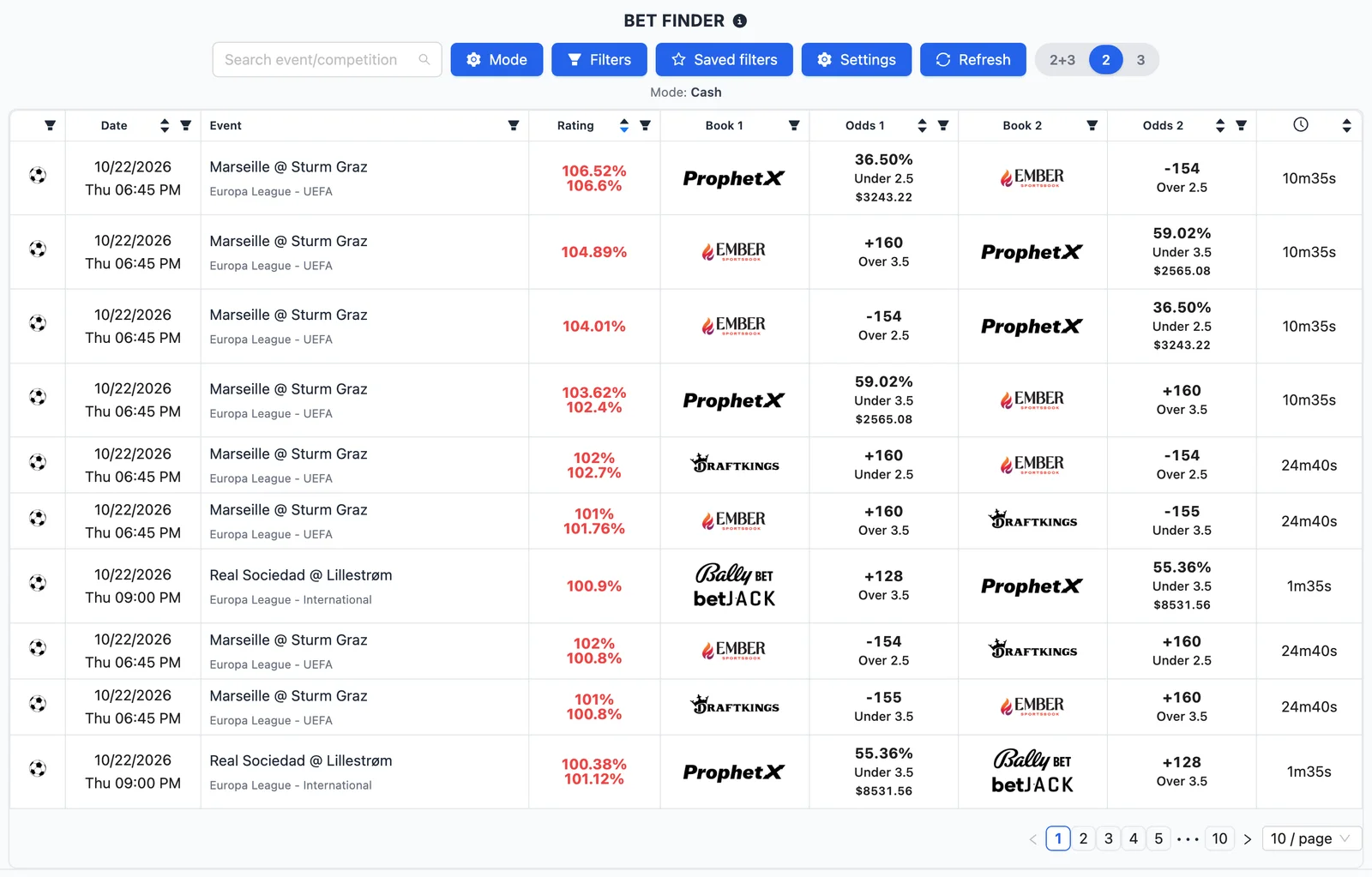
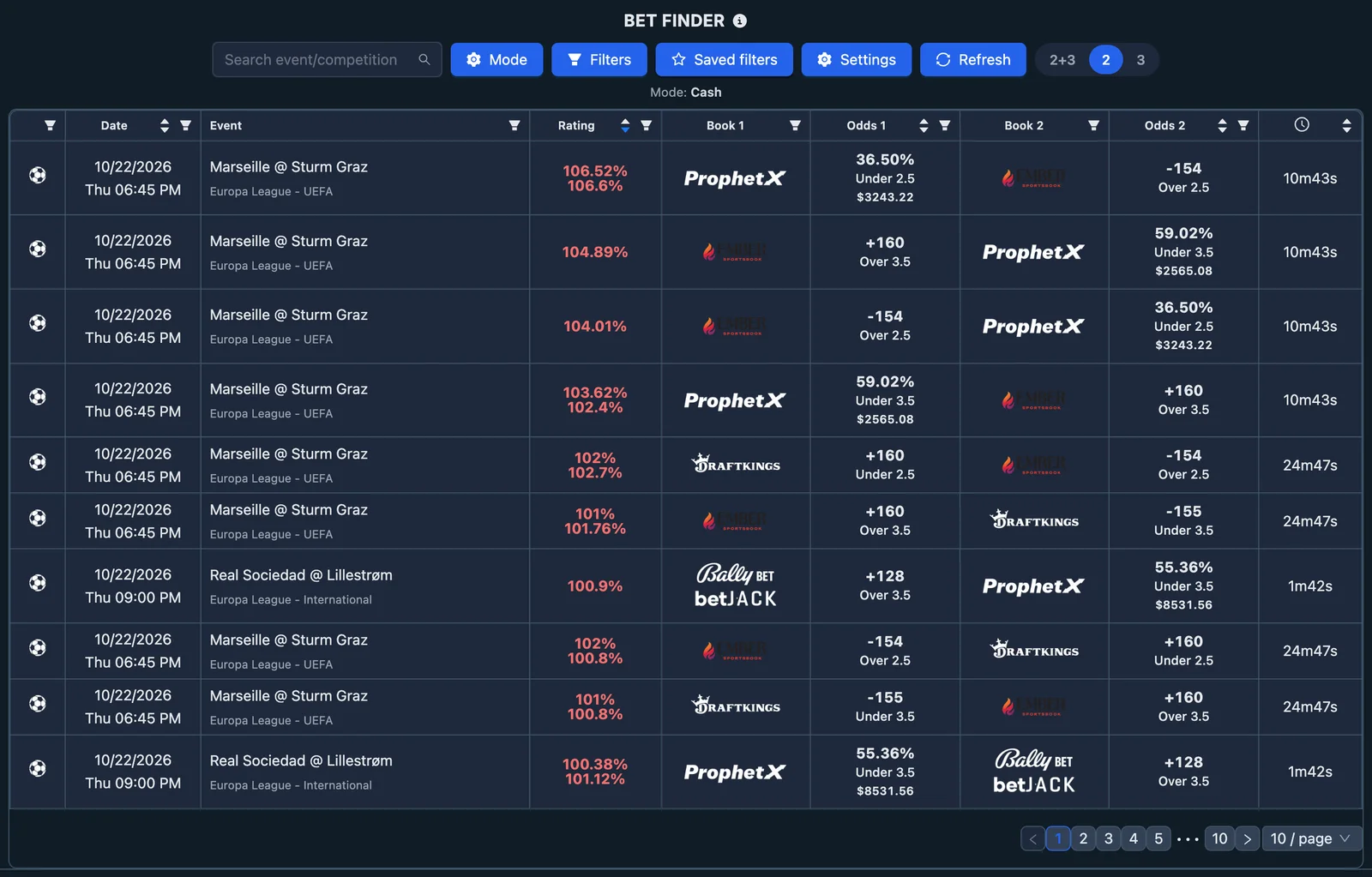
The results table will show sportsbook-to-sportsbook combinations that cover all possible outcomes of a market.
2. Select the Correct Rating Settings
Before choosing a bet, make sure the Bet Finder is using the rating mode that matches the offer you are completing.
Depending on the type of operation, the available modes include:
- Cash
- Bonus Bet
- 2nd Chance
- Playthrough
- Boost
You should also enter the stake of the bet and the values required by the selected mode. This allows the Bet Finder to calculate the rating of each combination according to your specific operation. Choosing the correct mode is essential because it changes how the tool evaluates the combinations. A row that looks good for a normal cash bet may not be the best one for a bonus, a playthrough, or a second chance offer.
3. Filter for the Sportsbook You Need
Since the offer requires you to place the main bet on a specific sportsbook, use the Sportsbook 1 filter to select it.
This is important because Sportsbook 1 is the site where you need to place the qualifying or promotional bet. The Bet Finder will then look for suitable hedge bets on the other sportsbook or sportsbooks.
You can also filter Sportsbook 2 and Sportsbook 3 when you want to include or exclude specific sites.
4. Choose a Suitable Combination
Once the filters and rating settings are correct, compare the available results and choose the combination that best fits your operation. You will want to look for a high rating, because a higher rating means a more efficient hedge for the selected mode.
5. Open the Calculator
Click the selected row to open the Bet Finder Calculator.
The calculator shows the exact amounts to place on each sportsbook and the expected result for every possible outcome of the event.
6. Check the Bets and Place Them
Before placing the bets, confirm that:
- The event is the same on every sportsbook.
- The market is exactly the same.
- The selections are correct.
- The odds still match those shown in the Bet Finder.
Once everything is correct, place all the bets using the stakes shown in the calculator.
What Data Is Shown in the Bet Finder Table
Each row in the Bet Finder represents a sportsbook-to-sportsbook combination that covers all possible outcomes of a market.


The table includes:
- Sport — the sport of the event.
- Date — the scheduled start date and time.
- Event — the match name with competition information.
- Rating — the efficiency of the combination based on the selected rating mode.
- Sportsbook 1 / Bet 1 / Odd 1 — the first sportsbook, the selection to bet, and its odds.
- Sportsbook 2 / Bet 2 / Odd 2 — the second sportsbook, the hedge selection, and its odds.
- Sportsbook 3 / Bet 3 / Odd 3 — shown only for three-leg combinations.
- Last Update — how recently the odds were refreshed. A more recent update is generally better, because sportsbook odds can move quickly. Even so, you should always verify the odds directly on the sportsbook before placing the bets.
Many columns can also be sorted or filtered directly from the table header.
2, 3, and 2+3 Combinations
At the top of the Bet Finder, you can choose which type of combinations to display:
- 2 — shows only two-leg combinations.
- 3 — shows only three-leg combinations.
- 2+3 — shows both types together.
2-leg combinations
These cover markets with two opposite outcomes, such as:
- Moneyline (two-way)
- Point Spread
- Totals Over / Under
- Player Prop Over / Under
3-leg combinations
These cover markets with three possible outcomes, such as a 3-way moneyline, where the result can be:
- Home
- Draw
- Away
Using 2+3 gives you the widest selection and allows you to compare different ways of covering the same type of operation. Selecting only 2 or only 3 can be useful when you already know how many sportsbooks you are willing to use.
Rating Settings
The Rating column changes depending on the mode you select. The purpose of the rating is always the same: helping you identify the most efficient combination.
A higher rating is better, but only when the selected mode matches the operation you are actually completing. Always set the rating mode first before comparing the rows in the table.
Max Hedge Stake
In a Bet Finder operation, the hedge bets on Sportsbook 2 — and on Sportsbook 3 for three-leg combinations — require their own real-money stakes. Depending on the odds, covering the main bet can require more cash than you have available on the other sportsbooks.
The Max Hedge Stake setting lets you show only the combinations you can actually afford to cover. You will find it in the Rating Settings, next to the bet amount. Once you enter a value, the Bet Finder hides every row where the total hedge stake — the stake on Sportsbook 2, plus the stake on Sportsbook 3 for three-leg combinations — is higher than that value.
This is useful when:
- You have a limited balance on the covering sportsbooks and only want to see combinations you can place.
- You are completing several offers at once and want to control how much money each hedge requires.
- You want to compare 2-leg and 3-leg combinations by the cash they require, and not only by their rating.
Leave the field empty to disable the filter and see every combination. Like the other rating settings, the value is saved in the page URL, so you can bookmark or share a search that already includes your maximum hedge stake.
Filtering the Bet Finder
The Bet Finder gives you two ways to filter the results.
1. Filters Button
The main filters button lets you configure the Bet Finder from one place. You can filter by data such as:
- Sport
- Date
- Sportsbook 1, 2, and 3
- Bet type
- Odds range
- Rating range
- Event or competition
- Other settings available in the tool
This is the fastest way to build a precise search before reviewing the results.
2. Filters Inside Each Column
You can also filter directly from the relevant columns in the table.
For example, you can:
- Filter sportsbooks from the Sportsbook columns.
- Filter market types and available odds from the Odds columns.
- Filter the rating from the Rating column.
- Search for or hide events from the Event column.
These column filters are useful when you are already looking at the table and want to refine the results without opening the full filter panel.
Searching for or Hiding Events and Competitions
The Bet Finder allows you to focus on specific matches or leagues through the event search functionality.
Search for events or competitions
You can search for:
- A specific match
- A team
- A league or competition
Once selected, the table will show only the matching results. This is useful when:
- An offer applies only to a certain league.
- You want to work on a specific match.
- You want to reduce the table to the events that interest you most.
Hide events or competitions
You can also hide events or competitions that you do not want to see.
This is useful when some events are not relevant to the offer you are completing, or when you want to clean up the table and focus on better opportunities.
Events can be hidden from the event filter or directly from the row itself.
How to Choose the Best Bet Finder Combination
Once you have selected the correct rating mode and applied the filters you need, compare the available rows and look for a high rating.
A higher rating means that the combination is more efficient for the selected operation.
However, rating is not the only thing to consider. Before choosing a row, also check:
- Whether the event is easy to find on all sportsbooks.
- Whether the sportsbooks involved are ones you can use.
- Whether the odds have been updated recently.
- Whether you are comfortable placing two or three separate bets.
The best combination is not always the one with the absolute highest rating. It is the one that offers a strong rating while remaining simple and practical to execute correctly.
Using the Bet Finder Calculator
When you click a row, the Bet Finder Calculator opens and shows the exact betting plan for that combination.
The calculator automatically uses the rating mode and the values entered in the Rating Settings, but you can also edit them directly here if needed.
You can adjust:
- The stake for the main bet on Sportsbook 1
- The values required by the selected rating mode
- The odds
- Any applicable commission or other settings
What the calculator shows
The calculator displays:
- The stake to place on Sportsbook 1
- The stake to place on Sportsbook 2
- The stake to place on Sportsbook 3, for three-leg combinations
- The expected net result for each possible event outcome
- The qualifying loss or profit, depending on the selected mode
If your settings use rounded stake amounts, the calculated stakes for Bet 2 and Bet 3 will be rounded to whole numbers. Always check the final numbers shown in the calculator, because rounding can slightly change the result.
The calculator is the source of truth when placing the bets.
Example 1: A 2-Outcome Bet Finder
Suppose you need to place a $100 qualifying bet on a sportsbook.
You:
- Open the Bet Finder.
- Select the correct rating mode and enter the relevant amount.
- Filter Sportsbook 1 for the sportsbook where you need to place the $100 bet.
- Look for a strong combination with a high rating.
- Open the calculator.
- Confirm the exact stake required on the second sportsbook.
- Open the event on both sportsbooks and check that:
- The match is the same.
- The market is the same.
- The odds still match.
- Place both bets.
- Record the bet in your Bet Tracker.
For example, on a Lakers vs Celtics game, this could be:
- Sportsbook 1: Lakers Moneyline
- Sportsbook 2: Celtics Moneyline
Whichever side wins, the calculator has already shown you the expected final result.
Example 2: A 3-Outcome Bet Finder
Suppose you need to place a $100 bet on a sportsbook and the best available opportunity is on a 3-way moneyline market.
You:
- Open the Bet Finder.
- Select the correct rating mode and enter the relevant amount.
- Filter for the sportsbook where the required promotional bet must be placed.
- Choose a suitable 3-leg row.
- Open the calculator.
- The calculator shows the two additional hedge stakes.
- Find the same event on all three sportsbooks.
- Confirm that the selections match exactly:
- Home
- Draw
- Away
- Place the three bets using the stakes shown.
- Record the operation in your Bet Tracker.
A three-leg Bet Finder is often useful when the market has three possible results and placing bets on all three outcomes gives a better overall rating than the available two-leg alternatives.
Important Checks Before Placing the Bets
Before confirming any Bet Finder operation, always verify the following.
1. The event is identical
Make sure all sportsbooks refer to the same match and the same scheduled event.
2. The market is identical
Check carefully that the bet type is the same. For example:
Over 220.5 is not the same as Over 221.5.
First Half is not the same as Full Game.
Team Total is not the same as Game Total.
3. The odds are still correct
Sportsbook odds can change quickly. Re-check them immediately before placing the bets, and avoid waiting too long after opening the calculator — if the odds move before you finish placing all bets, the expected result may change.
4. All required bets are placed
A 2-leg Bet Finder only works if both bets are placed.
A 3-leg Bet Finder only works if all three outcomes are covered.
5. The selected rating mode is correct
If the wrong mode is selected, the table rating and calculator results may not reflect the operation you are completing. Always set the rating mode before choosing a combination, because the best combination depends on whether you are using cash, a bonus, a playthrough, or another offer type.
6. The main bet is on the right sportsbook
If the offer requires you to place the main bet on a specific sportsbook, make sure that sportsbook is selected as Sportsbook 1.
7. Do not look only at the rating
A slightly lower-rated combination may sometimes be easier and safer to place if the event is clearer, the sportsbooks are easier to use, or the odds are more stable.
Useful Markets in the Bet Finder
The markets available may include combinations such as:
- Moneyline (two-way)
- Point Spread
- Totals Over / Under
- First Half Totals Over / Under
- Second Half Totals Over / Under
- Team Total Over / Under
- Player Prop Over / Under
- Even / Odd
- 3-way Moneyline (home, draw, away)
- First Half Moneyline or Spread combinations
- Second Half Moneyline or Spread combinations
Use the bet type filter to focus only on the markets you want to use.
Saving Filters and Rating Settings with the URL
When you apply filters, change the number of combinations, or select a rating mode, the Bet Finder updates the page URL with your current setup.
This means you can:
- Bookmark the page and reopen the Bet Finder later with the same filters already applied.
- Save different Bet Finder searches for different types of offers or sportsbooks.
- Share the link with another user or with support so they can open the same filtered view.
This is especially useful if you regularly use the Bet Finder with the same sportsbook, the same rating mode, or the same event filters.
Final Summary
The Bet Finder is the tool to use when you want to cover a sportsbook bet with bets on opposite outcomes across other sportsbooks.
To use it correctly:
- Open the Bet Finder.
- Select the rating mode that matches the offer.
- Enter the amount or value required by that mode.
- Filter for the sportsbook where you need to place the main bet.
- Choose whether to view 2-leg, 3-leg, or both types of combinations.
- Compare the rows and look for a strong rating.
- Open the calculator.
- Verify the event, market, selections, and odds on every sportsbook.
- Place all the bets with the stakes shown.
- Record the bet in your Bet Tracker.
Used correctly, the Bet Finder helps you complete qualifying bets, bonus bets, playthroughs, and other sportsbook operations with a controlled and clearly calculated result.
When to Use the Bet Finder
The Bet Finder is particularly useful when:
- You need to place a bet on a specific sportsbook to complete an offer or promotion.
- A sportsbook-to-sportsbook hedge is more convenient than using ProphetX.
- You want to compare two-outcome and three-outcome combinations to find the most efficient option.
How to Use the Bet Finder Step by Step
1. Open the Bet Finder
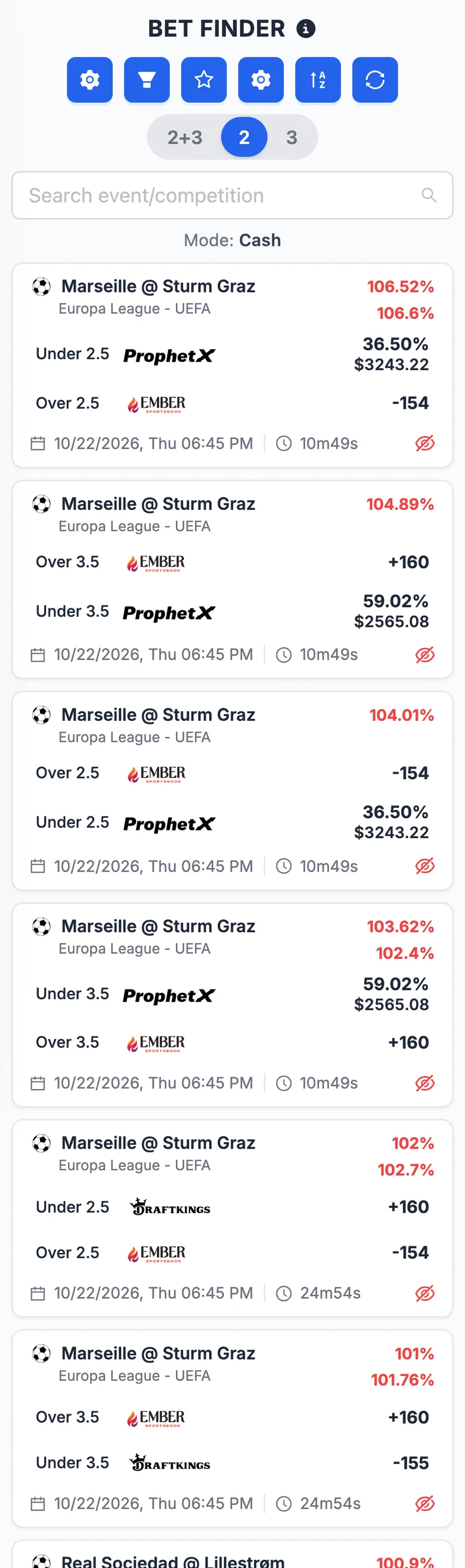
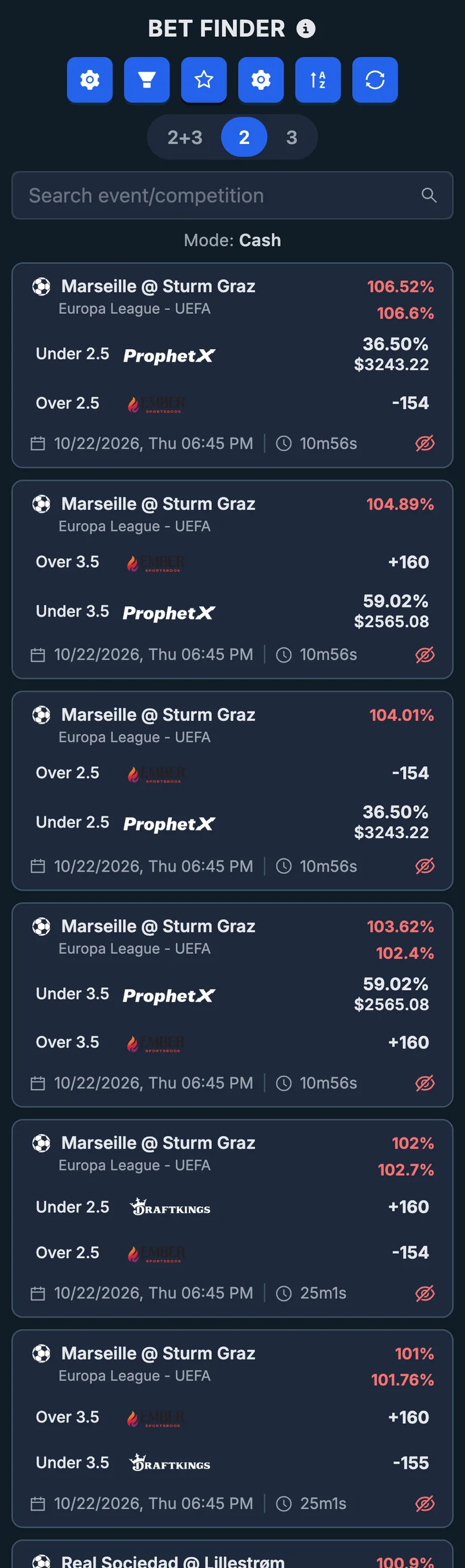
Open the Bet Finder from the NinjaBet tools area and you will see sportsbook-to-sportsbook combinations that cover all possible outcomes of a market.
2. Select the Correct Rating Settings
Before choosing a bet, make sure the Bet Finder is using the rating mode that matches the offer you are completing.
Depending on the type of operation, the available modes include:
- Cash
- Bonus Bet
- 2nd Chance
- Playthrough
- Boost
You should also enter the stake of the bet and the values required by the selected mode. This allows the Bet Finder to calculate the rating of each combination according to your specific operation. Choosing the correct mode is essential because it changes how the tool evaluates the combinations. A rating that looks good for a normal cash bet may not be the best one for a bonus, a playthrough, or a second chance offer.
3. Filter for the Sportsbook You Need
Since the offer requires you to place the main bet on a specific sportsbook, use the Sportsbook 1 filter to select it.
This is important because Sportsbook 1 is the site where you need to place the qualifying or promotional bet. The Bet Finder will then look for suitable hedge bets on the other sportsbook or sportsbooks.
You can also filter Sportsbook 2 and Sportsbook 3 when you want to include or exclude specific sites.
4. Choose a Suitable Combination
Once the filters and rating settings are correct, compare the available results and choose the combination that best fits your operation. You will want to look for a high rating, because a higher rating means a more efficient hedge for the selected mode.
5. Open the Calculator
Click the selected bet to open the Bet Finder Calculator.
The calculator shows the exact amounts to place on each sportsbook and the expected result for every possible outcome of the event.
6. Check the Bets and Place Them
Before placing the bets, confirm that:
- The event is the same on every sportsbook.
- The market is exactly the same.
- The selections are correct.
- The odds still match those shown in the Bet Finder.
Once everything is correct, place all the bets using the stakes shown in the calculator.
What Data Is Shown in the Bet Finder
Each bet in the Bet Finder represents a sportsbook‑to‑sportsbook combination that covers all possible outcomes of a market.
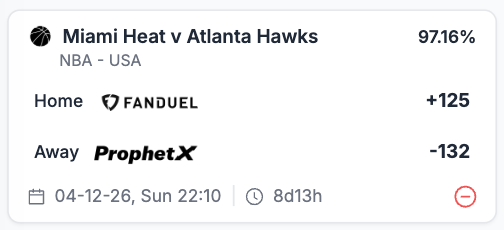
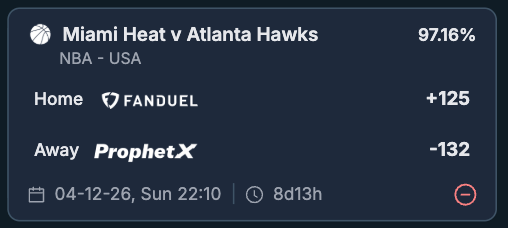
Each card includes:
- Sport icon and event — the sport icon next to the match name, with the competition and country shown underneath.
- Rating — shown on the top‑right of the card, based on the selected rating mode. If rounded decimals are enabled, multiple rating values are stacked.
- Bet 1 — the selection to bet, the sportsbook logo, and its odds, all on one line.
- Bet 2 — the hedge selection, the second sportsbook, and its odds.
- Bet 3 — shown only for three‑leg combinations.
- Date and time — at the bottom of the card.
- Last Update — how recently the odds were refreshed. A more recent update is generally better, because sportsbook odds can move quickly. Even so, you should always verify the odds directly on the sportsbook before placing the bets.
- Hide event — the red minus icon on the bottom‑right lets you hide that event from the list.
Sorting is done from the Sort button, which opens a bottom drawer where you can pick a field (Rating, Date, Odd 1, Odd 2, Odd 3 when applicable) and the ascending/descending direction. Filtering is done from the filter controls at the top of the page.
2, 3, and 2+3 Combinations
At the top of the Bet Finder, you can choose which type of combinations to display:
- 2 — shows only two-leg combinations.
- 3 — shows only three-leg combinations.
- 2+3 — shows both types together.
2-leg combinations
These cover markets with two opposite outcomes, such as:
- Moneyline (two-way)
- Point Spread
- Totals Over / Under
- Player Prop Over / Under
3-leg combinations
These cover markets with three possible outcomes, such as a 3-way moneyline, where the result can be:
- Home
- Draw
- Away
Using 2+3 gives you the widest selection and allows you to compare different ways of covering the same type of operation. Selecting only 2 or only 3 can be useful when you already know how many sportsbooks you are willing to use.
Rating Settings
The Rating changes depending on the mode you select. The purpose of the rating is always the same: helping you identify the most efficient combination.
A higher rating is better, but only when the selected mode matches the operation you are actually completing. Always set the rating mode first before comparing the bets available.
Max Hedge Stake
In a Bet Finder operation, the hedge bets on Sportsbook 2 — and on Sportsbook 3 for three-leg combinations — require their own real-money stakes. Depending on the odds, covering the main bet can require more cash than you have available on the other sportsbooks.
The Max Hedge Stake setting lets you show only the combinations you can actually afford to cover. You will find it in the Rating Settings, next to the bet amount. Once you enter a value, the Bet Finder hides every bet where the total hedge stake — the stake on Sportsbook 2, plus the stake on Sportsbook 3 for three-leg combinations — is higher than that value.
This is useful when:
- You have a limited balance on the covering sportsbooks and only want to see combinations you can place.
- You are completing several offers at once and want to control how much money each hedge requires.
- You want to compare 2-leg and 3-leg combinations by the cash they require, and not only by their rating.
Leave the field empty to disable the filter and see every combination. Like the other rating settings, the value is saved in the page URL, so you can bookmark or share a search that already includes your maximum hedge stake.
Filtering the Bet Finder
The filters button lets you configure the Bet Finder from one place. You can filter by data such as:
- Sport
- Date
- Sportsbook 1, 2, and 3
- Bet type
- Odds range
- Rating range
- Event or competition
- Number of combinations
- Other settings available in the tool
This is the fastest way to build a precise search before reviewing the results.
Searching for or Hiding Events and Competitions
The Bet Finder allows you to focus on specific matches or leagues through the event search functionality.
Search for events or competitions
You can search for:
- A specific match
- A team
- A league or competition
Once selected, the Bet Finder will show only the matching results. This is useful when:
- An offer applies only to a certain league.
- You want to work on a specific match.
- You want to reduce the table to the events that interest you most.
Hide events or competitions
You can also hide events or competitions that you do not want to see.
This is useful when some events are not relevant to the offer you are completing, or when you want to clean up the table and focus on better opportunities.
Events can be hidden from the filter or directly from the card itself.
How to Choose the Best Bet Finder Combination
Once you have selected the correct rating mode and applied the filters you need, compare the available bets and look for a high rating.
A higher rating means that the combination is more efficient for the selected operation.
However, rating is not the only thing to consider. Before choosing a bet, also check:
- Whether the event is easy to find on all sportsbooks.
- Whether the sportsbooks involved are ones you can use.
- Whether the odds have been updated recently.
- Whether you are comfortable placing two or three separate bets.
The best combination is not always the one with the absolute highest rating. It is the one that offers a strong rating while remaining simple and practical to execute correctly.
Using the Bet Finder Calculator
When you click a card, the Bet Finder Calculator opens and shows the exact betting plan for that combination.
The calculator automatically uses the rating mode and the values entered in the Rating Settings, but you can also edit them directly here if needed.
You can adjust:
- The stake for the main bet on Sportsbook 1
- The values required by the selected rating mode
- The odds
- Any applicable commission or other settings
What the calculator shows
The calculator displays:
- The stake to place on Sportsbook 1
- The stake to place on Sportsbook 2
- The stake to place on Sportsbook 3, for three-leg combinations
- The expected net result for each possible event outcome
- The qualifying loss or profit, depending on the selected mode
If your settings use rounded stake amounts, the calculated stakes for Bet 2 and Bet 3 will be rounded to whole numbers. Always check the final numbers shown in the calculator, because rounding can slightly change the result.
The calculator is the source of truth when placing the bets.
Example 1: A 2-Outcome Bet Finder
Suppose you need to place a $100 qualifying bet on a sportsbook.
You:
- Open the Bet Finder.
- Select the correct rating mode and enter the relevant amount.
- Filter Sportsbook 1 for the sportsbook where you need to place the $100 bet.
- Look for a strong combination with a high rating.
- Open the calculator.
- Confirm the exact stake required on the second sportsbook.
- Open the event on both sportsbooks and check that:
- The match is the same.
- The market is the same.
- The odds still match.
- Place both bets.
- Record the bet in your Bet Tracker.
For example, on a Lakers vs Celtics game, this could be:
- Sportsbook 1: Lakers Moneyline
- Sportsbook 2: Celtics Moneyline
Whichever side wins, the calculator has already shown you the expected final result.
Example 2: A 3-Outcome Bet Finder
Suppose you need to place a $100 bet on a sportsbook and the best available opportunity is on a 3-way moneyline market.
You:
- Open the Bet Finder.
- Select the correct rating mode and enter the relevant amount.
- Filter for the sportsbook where the required promotional bet must be placed.
- Choose a suitable 3-leg bet.
- Open the calculator.
- The calculator shows the two additional hedge stakes.
- Find the same event on all three sportsbooks.
- Confirm that the selections match exactly:
- Home
- Draw
- Away
- Place the three bets using the stakes shown.
- Record the operation in your Bet Tracker.
A three-leg Bet Finder is often useful when the market has three possible results and placing bets on all three outcomes gives a better overall rating than the available two-leg alternatives.
Important Checks Before Placing the Bets
Before confirming any Bet Finder operation, always verify the following.
1. The event is identical
Make sure all sportsbooks refer to the same match and the same scheduled event.
2. The market is identical
Check carefully that the bet type is the same. For example:
Over 220.5 is not the same as Over 221.5.
First Half is not the same as Full Game.
Team Total is not the same as Game Total.
3. The odds are still correct
Sportsbook odds can change quickly. Re-check them immediately before placing the bets, and avoid waiting too long after opening the calculator — if the odds move before you finish placing all bets, the expected result may change.
4. All required bets are placed
A 2-leg Bet Finder only works if both bets are placed.
A 3-leg Bet Finder only works if all three outcomes are covered.
5. The selected rating mode is correct
If the wrong mode is selected, the table rating and calculator results may not reflect the operation you are completing. Always set the rating mode before choosing a combination, because the best combination depends on whether you are using cash, a bonus, a playthrough, or another offer type.
6. The main bet is on the right sportsbook
If the offer requires you to place the main bet on a specific sportsbook, make sure that sportsbook is selected as Sportsbook 1.
7. Do not look only at the rating
A slightly lower-rated combination may sometimes be easier and safer to place if the event is clearer, the sportsbooks are easier to use, or the odds are more stable.
Useful Markets in the Bet Finder
The markets available may include combinations such as:
- Moneyline (two-way)
- Point Spread
- Totals Over / Under
- First Half Totals Over / Under
- Second Half Totals Over / Under
- Team Total Over / Under
- Player Prop Over / Under
- Even / Odd
- 3-way Moneyline (home, draw, away)
- First Half Moneyline or Spread combinations
- Second Half Moneyline or Spread combinations
Use the bet type filter to focus only on the markets you want to use.
Saving Filters and Rating Settings with the URL
When you apply filters, change the number of combinations, or select a rating mode, the Bet Finder updates the page URL with your current setup.
This means you can:
- Bookmark the page and reopen the Bet Finder later with the same filters already applied.
- Save different Bet Finder searches for different types of offers or sportsbooks.
- Share the link with another user or with support so they can open the same filtered view.
This is especially useful if you regularly use the Bet Finder with the same sportsbook, the same rating mode, or the same event filters.
Final Summary
The Bet Finder is the tool to use when you want to cover a sportsbook bet with bets on opposite outcomes across other sportsbooks.
To use it correctly:
- Open the Bet Finder.
- Select the rating mode that matches the offer.
- Enter the amount or value required by that mode.
- Filter for the sportsbook where you need to place the main bet.
- Choose whether to view 2-leg, 3-leg, or both types of combinations.
- Compare the bets and look for a strong rating.
- Open the calculator.
- Verify the event, market, selections, and odds on every sportsbook.
- Place all the bets with the stakes shown.
- Record the bet in your Bet Tracker.
Used correctly, the Bet Finder helps you complete qualifying bets, bonus bets, playthroughs, and other sportsbook operations with a controlled and clearly calculated result.